


From images and PDFs to a catalog: importing with Menu AI step by step
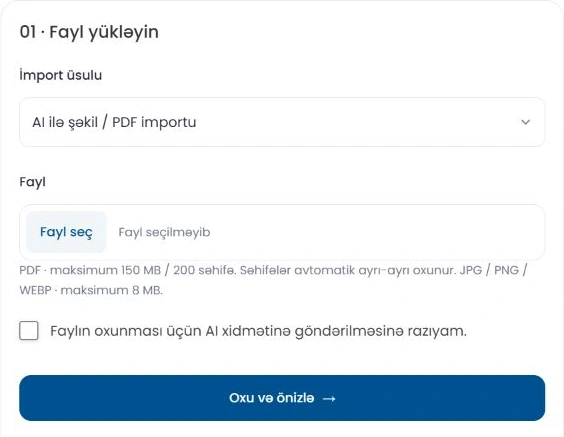
If you already have a menu image or a PDF price list, you may not need to type every product again. Menu AI reads the file and prepares a catalog draft that you can review. The result is not published directly: you review the products and changes first.
1. Choose your goal
In the business dashboard, open Import and export. To add new products, choose the addition workflow. If an existing catalog has changed, use update mode. When only prices have changed, the price update option helps prevent accidental changes to names, descriptions and images.
2. Upload a readable file
Choose an image or PDF in which the text and prices are fully visible. Skewed, blurry or cropped pages can reduce accuracy. PDF credits are calculated per page, while image credits are calculated per file. Before starting, review the file requirements and credit balance shown in the dashboard.
3. Check the matches
Compare new products with existing products in the preview. Similar names do not always mean the same product. If a match is uncertain, select the correct product yourself. Review the category, ingredients, price, extras and variants separately.
For example, if a drink has separate prices for 250 ml and 500 ml, check that the sizes are linked to the correct prices. If the source does not specify a size, clarify it rather than guessing. Option groups should be consistent across the variants of the same product.
4. Save only the changes you need
The fields selected in the preview determine the final operation. Before saving, check the number of new and updated products. A price update does not change existing images. Importing an image/PDF does not mean that all product photos in the document are copied automatically; check product images separately and add them when needed.
5. Verify the result in the catalog
After saving, open a few products and check their prices, variants and descriptions. The change history of new imports can be followed in the admin panel. Restoration is possible only for the latest eligible import and after protective checks for subsequent changes have passed.
The easiest way to begin is to test the workflow with a small, clear file. You can then update a large catalog using the same review process.
Your business, in one link.
Prepare your catalog, check its appearance and share it with customers.