


A consistent product style with Menu AI: preparing descriptions and images
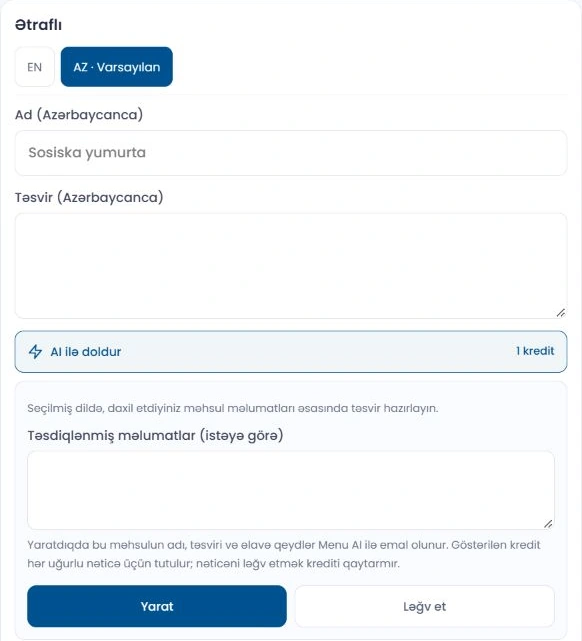
In a good product presentation, the image and description should tell the same story. Menu AI helps you prepare text and image drafts. The final decision is yours: review the result, adapt it to your product and only then apply it.
Start with accurate product information
Clearly describe the product name, main ingredients, size and distinguishing features. AI does not know missing information with certainty. In particular, check ingredient, allergen, technical specification and compatibility claims against real product information. Do not let an attractive description provide incorrect information.
Start in the Studio or editing window
Menu AI Studio remains a separate workspace. When editing a product, you can also use the existing Fill with Ai and Create with Ai buttons. The interface shows which tools are active in your account and the credits required for the operation.
Selecting generated text and an image does not yet complete the product update. Apply the result in the product editor and save the form. If an image is unsuitable, you can generate another result without selecting it.
Choose the same visual language for several products
Choose a suitable image style from those available for the business. For example, a dark background, dramatic lighting and a premium presentation can help create a similar appearance across all products. A style guides lighting, background and composition; it should not make every product’s shape and ingredients identical.
To create a style in the admin panel, one to three reference images can be uploaded and their appearance analysed. After the suggested rules are reviewed and saved, the style becomes available for use. Reference images should have lighting, backgrounds and presentation that are as similar as possible.
Compare the AI image with the real product
The portion, container, colour, product shape and extras in the image should match the real presentation. Do not automatically treat an AI result as a real photograph of the product. If a detail is unsuitable, clarify the instructions or use your own image.
Video and AR are prepared separately
You can upload prepared product videos and ingredient animation files to the dashboard. AI video generation is not currently offered as an active feature. AR requires a separate compatible 3D model file; uploading a product image alone does not automatically create an AR model.
Before publishing, make the final check on a phone: the product name, price, description and media should be clear together.
Your business, in one link.
Prepare your catalog, check its appearance and share it with customers.